How to Get Your Products Recommended by AI (ChatGPT, Perplexity, and Google)
AI shopping agents don't browse your store the way a person does. They retrieve, compare, and recommend the products they can fully describe and trust. Here is how that decision works across ChatGPT, Perplexity, and Google, and what a store owner controls at each step.
To get your products recommended by AI, your product pages have to give a shopping agent three things: something it can read, enough data to compare you against the alternatives, and enough proof to trust and buy from you. AI assistants like ChatGPT, Perplexity, and Google's AI answers don't browse a store the way a person does. They retrieve candidate products from a search index or a catalog feed, compare the ones they can fully describe, and recommend the few they can stand behind. This guide covers how that decision works and what you control at each step.
What is an AI shopping agent?
An AI shopping agent is software that answers a shopper's question by finding, comparing, and recommending real products on their behalf, instead of handing back a page of links to sort through yourself. When someone asks ChatGPT for "a waterproof jacket for spring hiking under $150," the assistant does the searching, reads the candidates, and comes back with a short list and reasons.
The agents that matter for stores today are ChatGPT Shopping, Perplexity, Google's AI Overviews and AI Mode, and Gemini. They differ in where they get their candidates, but they share one habit that decides your visibility: they recommend what they can describe. A product the agent can read in full, compare on real attributes, and trust enough to buy from is a product it will put in front of a shopper. One it can only half-read gets left out of the comparison, not argued against.
That is the shift. You are no longer optimizing to rank on a results page a person will scan. You are giving a machine enough to reason with.
How does an AI shopping agent decide what to recommend?
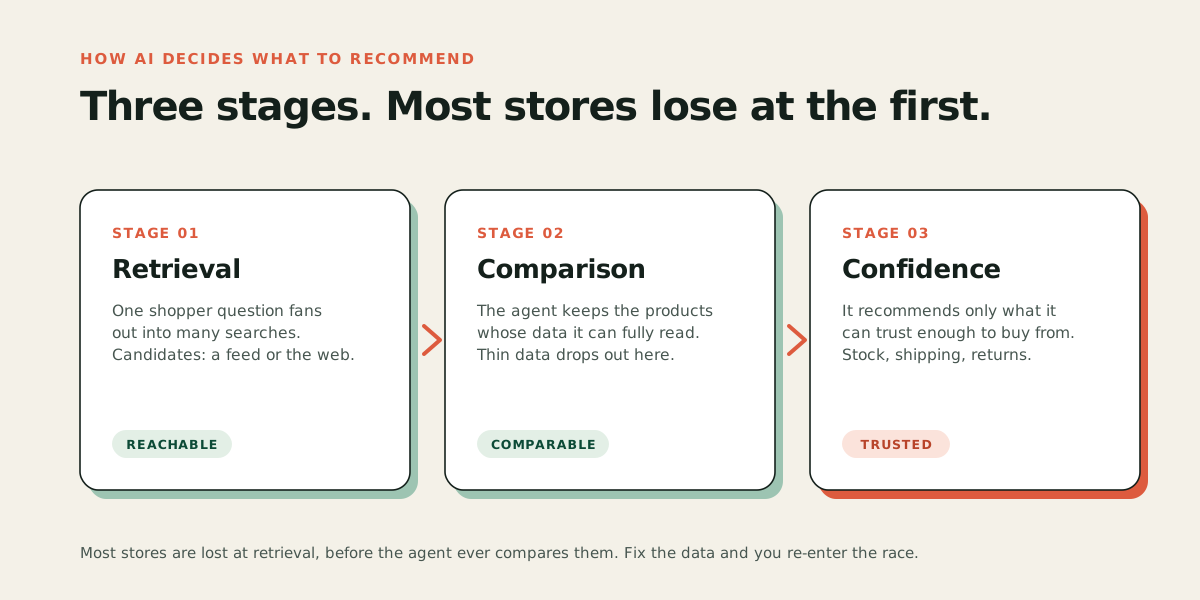
In three stages: retrieval, comparison, and confidence. Understanding the order is the whole game, because most stores lose at the first stage without ever knowing it.
Retrieval: it invents the searches you didn't. An agent rarely searches for the shopper's exact words. It fans one question out into many narrower ones. "A gift for a friend who just started running" quietly becomes searches for beginner running shoes, running socks, a hydration belt, a specific price band, and so on. For each of those hidden searches it pulls a set of candidate products from a search index or a catalog feed. If your product isn't retrieved for any of them, the agent never sees it, and nothing else you do matters. Retrieval is decided by whether you are indexed and readable at all.
Comparison: it favors what it can fully describe. Once it has candidates, the agent compares them on the attributes it can actually read: material, size, price, availability, category, reviews. A product with complete, structured data can be matched against the shopper's constraints. A product described only in mood copy gives the agent nothing to compare, so it quietly loses to the one that listed its facts.
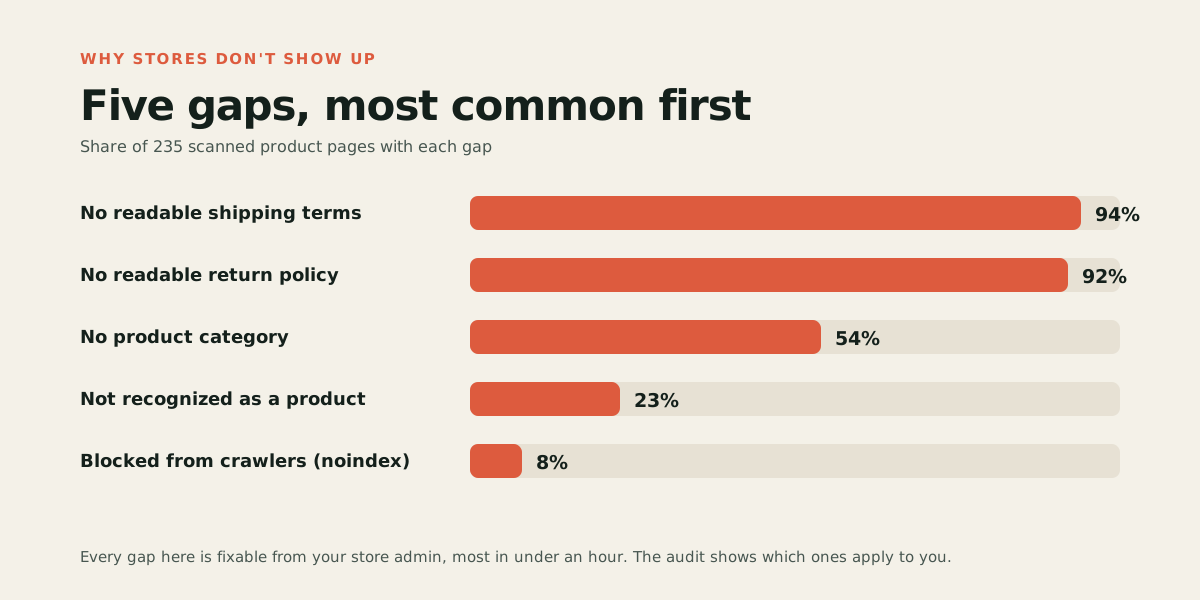
Confidence: it recommends what it can stand behind. The last filter is trust. Can it confirm the product is in stock, what shipping and returns look like, and increasingly whether a purchase could be completed? In our scan of 235 live product pages, 47 percent had none of the three things an agent needs to complete a purchase, and 92 to 94 percent published shipping and returns only as page text rather than as readable data. Those stores can be read and compared, but the agent has no confident way to close the loop, so a more complete competitor gets the recommendation. The full breakdown is in our study of 235 product pages.
Why being listed is not the same as being recommended
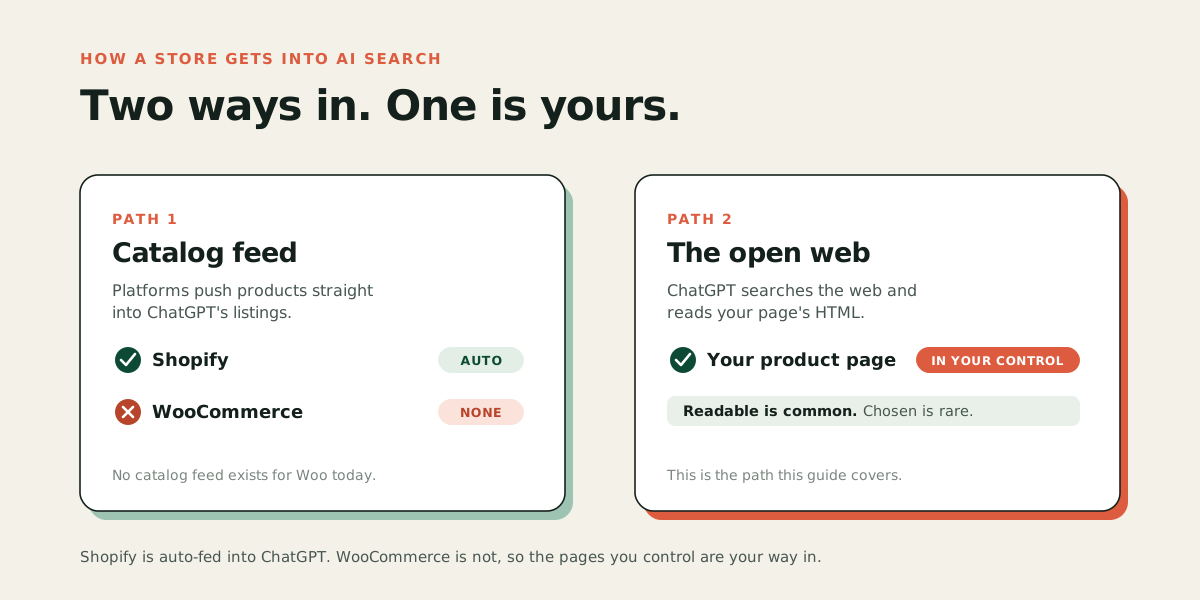
There are two ways a product reaches an agent, and stores confuse them constantly.
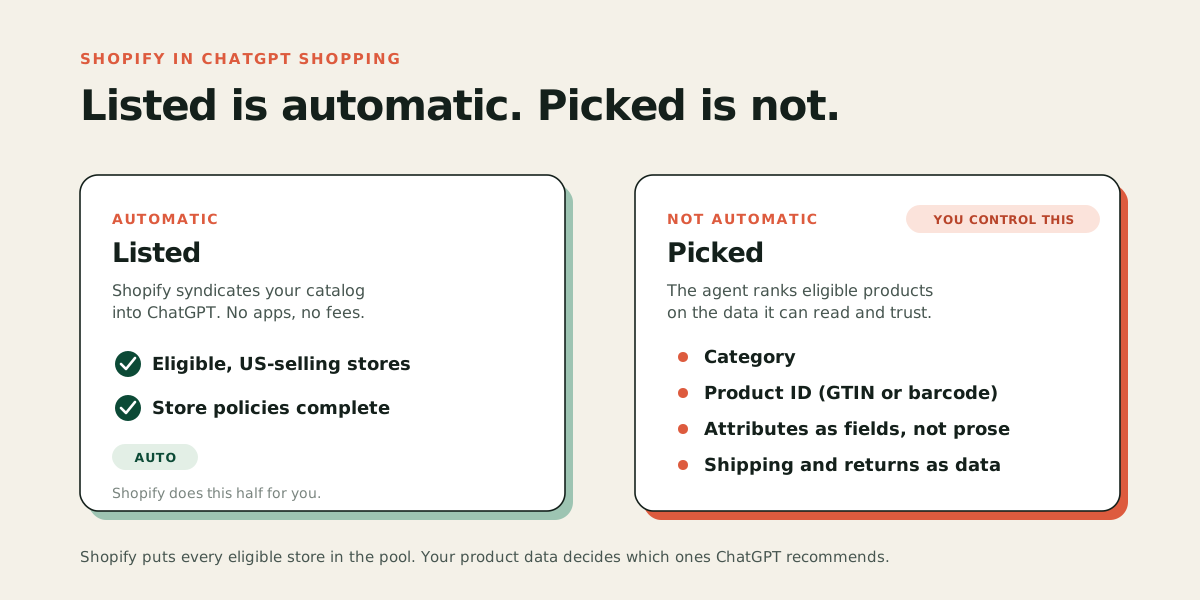
The first is a catalog feed. Shopify turned this on by default for eligible US-selling merchants in early 2026, syndicating their catalogs through Shopify Catalog into ChatGPT and other agent surfaces, so most Shopify stores are listed without lifting a finger. The second is the open web, where an assistant searches, lands on your product page, and reads it on the spot. Most WooCommerce stores have no feed, so this is their only path, and it is fully in their control. Our WooCommerce guide covers that path in detail.
Here is the part owners miss: a feed gets you into the candidate set, but it does not get you recommended. The agent still compares you on your data, and a feed built from thin product records competes just as poorly as a thin web page. Whether you arrive by feed or by web, you are judged on the same thing. Getting your Shopify catalog into ChatGPT is the start, not the finish; what to do after you're listed is a separate job.
How does each platform find your products?
The engines retrieve from different places, which changes where your pages need to be indexed. The mechanics below shift often, so treat this as a map, not a spec.
| Engine | Where it gets candidates | What that means for you |
|---|---|---|
| ChatGPT Shopping | A catalog feed for eligible platforms, plus web search that runs largely on Bing's index | Get indexed in Bing, not only Google, and complete your product data whether or not you have a feed. |
| Perplexity | Its own crawler (PerplexityBot) plus Bing-indexed pages, read at query time | Let PerplexityBot in via robots.txt, stay indexed in Bing, and keep your pages as readable HTML. |
| Google AI Overviews / AI Mode | Google's own search index and ranking systems | Classic Google indexing is the entry ticket; structured product data helps it resolve your product. |
| Gemini | Rides Googlebot's rendering and Google's index | Same as Google, and Gemini is the one major engine that runs your JavaScript, because it uses Googlebot's renderer. |
Four of the five major engines read the HTML your server sends and do not run your JavaScript. Vercel's analysis of AI crawler logs found the major crawlers fetch JavaScript files without executing them, with Gemini the exception. So whatever is missing from the raw page response is missing from the product as far as the agent is concerned.
What do you actually control?
More than it feels like. The agents' behavior is out of your hands, but almost everything that feeds their decision is a property of your own page. Four levers do most of the work.
Crawler access. If your robots.txt or your security layer blocks GPTBot, OAI-SearchBot, ClaudeBot, or PerplexityBot, you are invisible before the contest starts. This is the cheapest thing to check and the most embarrassing to get wrong.
Product data completeness. Brand, category, a full product identifier, real attributes as structured fields rather than only prose. In our scan, 39 percent of pages were not even marked as a product, and 54 percent had no category. Each missing field is a comparison you can't win.
Trust signals as data. Stock status, shipping terms, and return policy published in a form an agent can read, not buried in a paragraph a person has to interpret. This is the single largest gap in the study and the fastest to close, because you almost certainly have the information already; it just isn't structured.
Indexing and freshness. Submit your sitemap in Google Search Console and Bing Webmaster Tools. Bing matters more than its search share suggests, because it feeds ChatGPT. Recently updated pages get cited more often than stale ones, so fixing a page and getting it recrawled is a real lever, not housekeeping.
If your store isn't appearing at all, the most common causes map almost one to one onto these four levers.
Where do you start?
Start with evidence, not a checklist. Run the free audit on one of your best product pages. It fetches the page the way an AI crawler does, runs the same checks that produced the 235-page study, and shows you which of these gaps actually apply to your store, with the evidence for each. Most owners find that two or three fixes cover most of the distance, and that the distance from the middle of the pack to the top is smaller than they expected.
From there, follow the path for your platform: the Shopify or WooCommerce guide for the how, and a product feed built on complete records if you run one. Fix the data, get recrawled, then check how the assistants describe your products. When you want the fixes made for you rather than by hand, start a free trial and Acom does the work across your catalog.