How to Get Your Shopify Products into ChatGPT Shopping
Shopify already sends your catalog to ChatGPT automatically. Getting listed is not the same as getting picked. Here is what ChatGPT reads, in what order, and the product data checks a Shopify owner can run today.
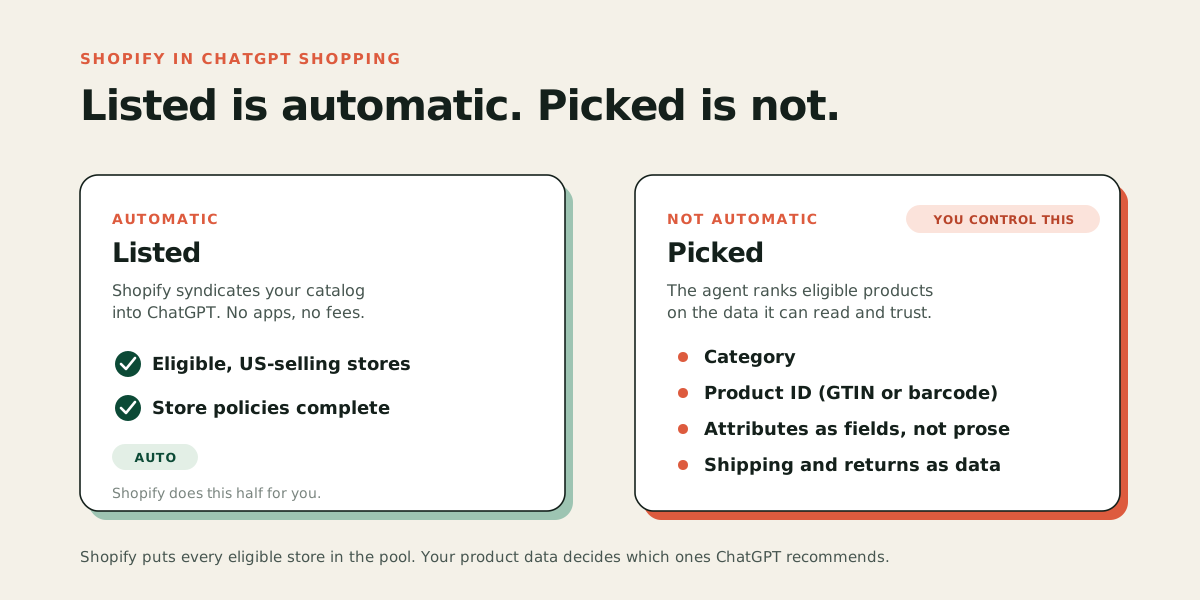
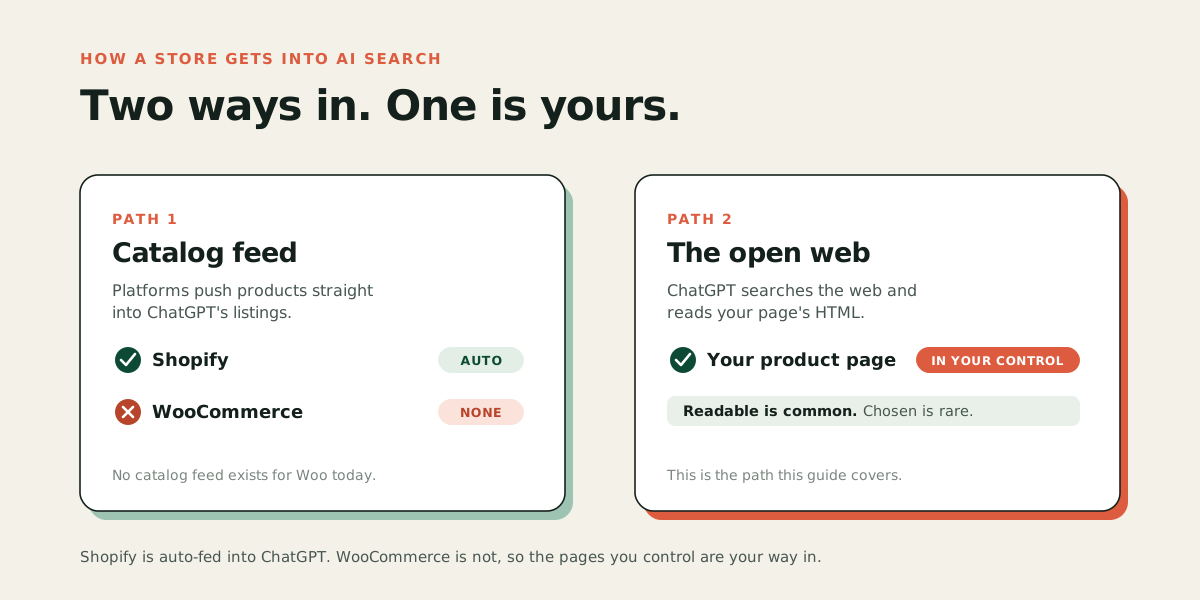
If you run a Shopify store that sells to US buyers, your products are most likely already in ChatGPT. Shopify automatically activates Agentic Storefronts for eligible merchants and syndicates your catalog through Shopify Catalog, with no apps to install and no extra fees. ChatGPT and Microsoft Copilot are live for any Shopify merchant selling to US buyers. Google AI Mode and the Gemini app are still in early access for selected US-based stores. OpenAI confirms the same thing from its side: if you sell through Shopify, your catalog is already integrated and no application is needed. Getting listed turns out to be the easy half. Getting picked is the part nobody hands you. When a shopper asks ChatGPT for "a waterproof hiking boot under $180," the agent chooses between thousands of eligible products, and it favors the ones whose data it can read and trust. This post covers what ChatGPT actually reads, in what order, and the checks you can run on your own store today.
Are my Shopify products already in ChatGPT?
Almost certainly yes, if you sell to US buyers.
Shopify's Agentic Storefronts sales channel is turned on automatically for eligible merchants. Your products flow into Shopify Catalog, the structured data layer Shopify maintains, and Catalog syndicates them to connected AI platforms.
Shopify's stated eligibility rule for ChatGPT is any merchant in Shopify Catalog who sells to US buyers, regardless of where the store itself is based. There are three other conditions in the fine print: your products have to be eligible for Shopify Catalog, you have to accept the Agentic Storefronts supplemental terms, and you have to have your terms of service, privacy policy, and return and refund policy filled in under Settings, then Policies. That last one is the one stores actually fail.
You can confirm it in your admin under Sales channels, then Agentic. For ChatGPT there is no direct-checkout toggle to manage, because the purchase happens on your own store in an in-app browser rather than inside the chat.
Two things worth knowing before you go further. Shopping in ChatGPT is currently live for US buyers only, and OpenAI has stepped back from running checkout inside ChatGPT itself. The model now is discovery in the chat, purchase on your site. That is good news for a store owner, because it means your product page, your checkout, and your customer relationship all stay yours.
Why are my products listed but never recommended?
Because listing and ranking are two different problems, and Shopify only solves the first one for you.
Shopify says ranking factors vary by AI platform but can include data quality, relevance, availability, pricing, and what it calls "engagement signals," meaning whether shoppers click and buy. OpenAI's own merchant guidance points the same way: richer data helps your products surface with more accurate information when shoppers compare options, and feeds give you greater control over how your products appear.
Read that as a straight statement of the rules. Every eligible Shopify store is in the pool. The agent then has to pick a handful of products to show, and it prefers the ones it can describe confidently, compare on specifics, and vouch for. A product with a vague title, no category, no barcode, no readable reviews, and shipping terms buried in a policy page is a product the agent cannot say much about. So it says nothing about it.
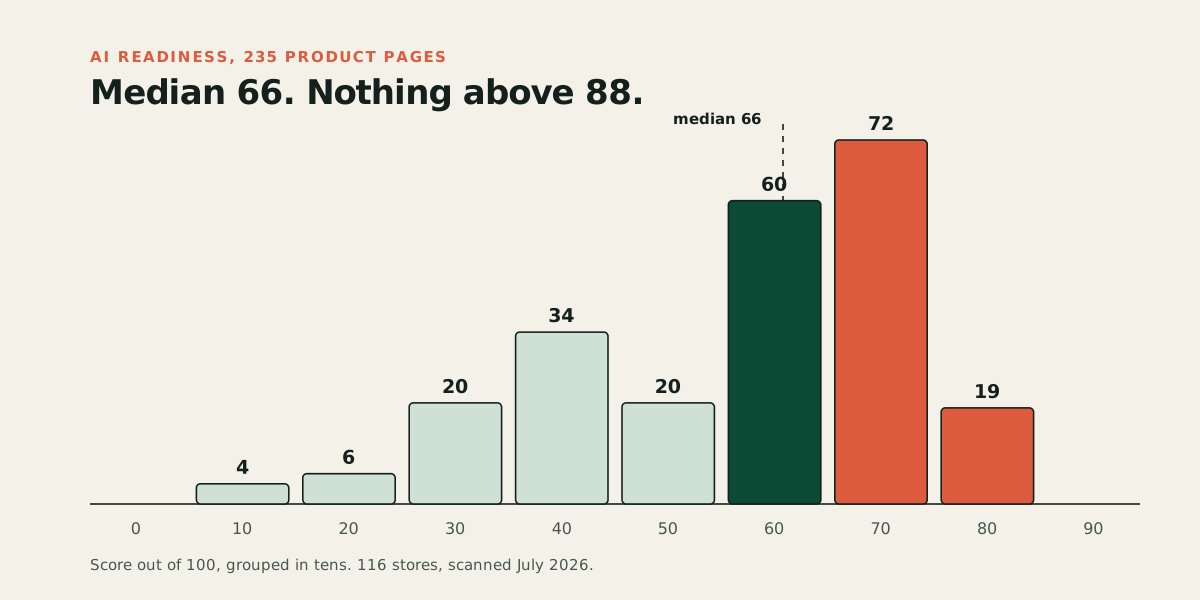
We see this pattern in our own data. In July 2026 we scanned 235 live product pages across 116 stores, 127 of them on Shopify, scoring each on whether an AI agent could read the product, compare it, and complete a purchase. Ninety-four percent of pages had no shipping terms an agent could read as data, and 92 percent had no readable return policy. For 47 percent, an agent had none of the three things it needs to complete a purchase. Shopify's Catalog layer fills in some of this automatically, but the underlying habit shows up on Shopify stores too: merchants write for people and assume machines will work out the rest. The full breakdown is in our study of 235 product pages. For how that choice gets made across every platform, see how to get your products recommended by AI.
What does ChatGPT actually read, and in what order?
There is a clear hierarchy, and most store owners have it backwards.
| What ChatGPT reads | Where it comes from for a Shopify store | How much it matters |
|---|---|---|
| Structured product feed data | Shopify Catalog, syndicated automatically | Primary. OpenAI's spec describes the merchant feed as how ChatGPT indexes and displays products with up-to-date price and availability |
| Inferred attributes | Shopify Catalog adds attributes using machine learning and transaction signals | Helpful, but it is Shopify guessing on your behalf rather than you telling it |
| Your live web pages | Crawled from your storefront | Fallback. Shopify notes that platforms without structured access fall back on scraping, which often surfaces stale pricing and inventory |
| Brand and policy answers | Shopify's Knowledge Base app, if you install and fill it | Decides what the agent says when a shopper asks about returns or shipping |
The practical takeaway: your product fields do more work than your product page copy. A beautifully written description will not rescue a listing that has no category, no product ID, and no attributes. The description helps the agent understand what the product is for. The fields decide whether it can compare you to anything.
Which product fields matter most?
OpenAI's product feed specification, part of the Agentic Commerce Protocol it built with Stripe, is the clearest public statement of what data these agents want. It is written for developers, but the field list tells any store owner where to aim.
Here is the plain-English version of what to fill in, in rough order of payoff.
Category and product type. What kind of thing is this? The spec lists category as optional, but it is the field that puts you in the right comparison set, and it is the one we most often find empty. It is also one of the cheapest to fix in Shopify admin.
Product identifiers. Barcode or GTIN, plus SKU. Identifiers let an agent recognize your product as the same item it has seen on other sites, so it can pull in reviews and price comparisons instead of treating yours as an unknown.
Brand and seller information. The spec lists brand, seller name, and seller URL as required fields. If an agent cannot say who is selling something, it is slower to recommend it.
Physical attributes as their own fields. Color, size, material, gender where relevant. The spec marks size and size system as recommended for apparel, and lists color, material, and gender as optional fields worth filling in. "Available in charcoal and sand" inside a paragraph is not a color field. Put it in the actual color and size options on the product, not just in the write-up.
Availability and price accuracy. Both are ranking inputs, and both are handled automatically by Shopify Catalog as long as your inventory tracking is honest. If you run stock levels loosely, that shows up here.
Shipping and returns. The spec makes a link to your return policy a required field, and it has a shipping field that carries the price, handling days, and transit days together. Shipping itself is optional in the spec, but it is the question shoppers ask agents constantly, and it is where most stores go quiet.
Reviews and ratings. Not required, but they are exactly the trust signal an agent reaches for when it has to choose between two similar products.
What should I check on my Shopify store this week?
Five checks, in order. None of them need a developer.
-
Confirm Agentic Storefronts is active and your policies are filled in. In your admin, go to Sales channels, then Agentic. Confirm you sell to US buyers, since that is the current eligibility gate for ChatGPT. Then go to Settings, then Policies, and check that your terms of service, privacy policy, and return and refund policy are all complete. Empty policy pages can keep you out.
-
Audit your product type and category coverage. Export your product list and look at how many products have a real product type and a Shopify standard product category assigned. In our scan of 235 product pages, 54 percent of products could not be placed in a category at all, and Shopify stores were in that group.
-
Check identifiers on your top 20 products. Barcode or GTIN filled in, SKU filled in. Start with the products you actually want recommended, not the whole catalog.
-
Move attributes out of prose and into fields. Read one of your best product descriptions and list every fact in it: material, dimensions, care instructions, who it suits. Then check how many of those facts are filled into an actual field in Shopify rather than just written in the description. That gap is the work.
-
Ask ChatGPT for your own product. Describe your product the way a shopper who does not know your brand would describe it, in a fresh chat, from a US context. See what comes back. This is imperfect, since results vary between sessions and accounts, but it tells you fast whether an agent can find you at all in your own category.
Does installing the Knowledge Base app help?
It helps with a specific problem: what the agent says about your store when a shopper asks a question your product data does not answer.
Shopify's Knowledge Base app lets you upload return policies, shipping information, and FAQs so an agent references verified answers instead of generating a guess from whatever it scraped. If a shopper asks "does this brand do free returns" and the agent hedges or gets it wrong, that is a sale you never hear about.
It is a small install with a clear job. Fill it with your actual policies, in short direct answers, and keep it current.
How is Shopify different from other platforms here?
Shopify has done more of this work for you by default than most platforms, which is both the advantage and the trap.
| Shopify | WooCommerce and most others | |
|---|---|---|
| Listed in ChatGPT | Automatic for eligible US-selling merchants | Nothing automatic; you have to apply to OpenAI to submit a feed |
| Structured data layer | Shopify Catalog, maintained for you | Whatever your theme and plugins emit |
| Attribute inference | Catalog infers extra attributes from transaction signals | None |
| Checkout in AI channels | Shopify's own checkout runs inside Copilot and Google AI Mode; for ChatGPT the buyer lands on your site in an in-app browser | Build it yourself, or use Shopify's Agentic Plan, which syncs your products into Shopify Catalog without replatforming and charges no monthly fee |
| What you still control | Product data quality, which decides ranking | Everything, including whether you are visible at all |
The trap is assuming automatic enrollment is the finish line. It puts you in the pool. Data quality decides what happens next, and that part is still yours. If you run a WooCommerce store, the situation is different enough that it needs its own answer, which we cover in how to get your WooCommerce store into AI search.
What happens if you do nothing?
Probably nothing dramatic, for now. Between January 2025 and the first quarter of 2026, AI-referred sessions on Shopify stores grew more than 8 times and AI-referred orders grew nearly 13 times, according to Shopify's own Q1 2026 reporting. Those are large multiples on what is still a small base for most SMB stores.
The reason to act early is that product data work compounds. Categories, identifiers, and attributes are not a campaign you run once and measure next month. They are the foundation every AI channel reads from, and every new channel that launches will read the same fields. Filling them in now costs a few hours. Filling them in after a competitor has been recommended in your category for a year costs a lot more.
Can a tool do this for me?
You can do all of the above by hand. The checks in this post are deliberately ones you can run yourself, and nothing here requires a tool.
If you want to see where a specific product stands before you start, run our free AI readiness audit. Paste one product link, and you get a score out of 100 with the specific gaps, in about 60 seconds. Every point traces to something checkable on the real page. No invented benchmarks.
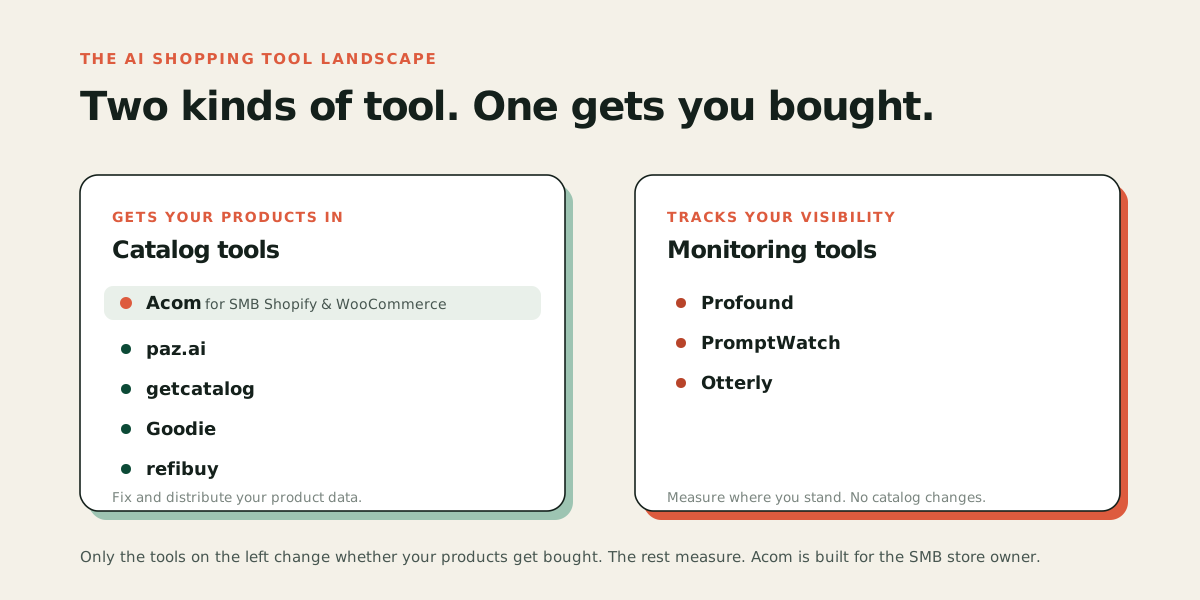
If you want the fixes applied across the catalog rather than product by product, that is what Acom does. Start a free trial, connect your store, review what we propose, and approve it before anything goes live.